Now I start my blog with a basic tutorial for Photoshop. I used Adobe Photoshop CS 4 as a tutorial media. in this introduction, I will just show you some basic functions along with their names. Hope it will useful for you =)
1. new file
Just like the ordinary software, we must create a new file to begin using photoshop. the picture below shows the standard 'new file' setting in photoshop CS4.

Note: you can change the preset to get more option of the paper size.
2. layer
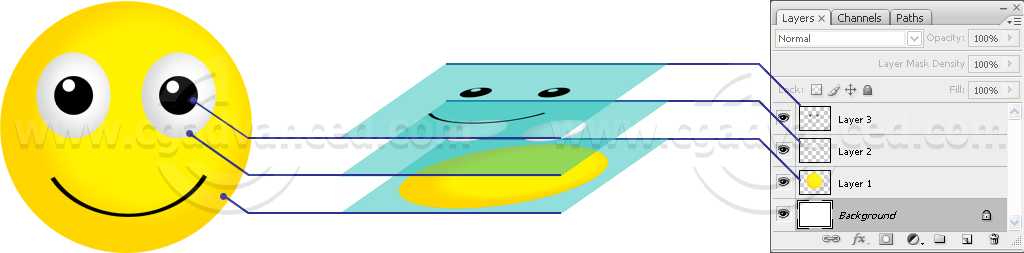
photoshop is a layer-based software. you will find it very helpful when starting to create your artworks. we can simply edit our object without disturbing the other object in different layer.
this is the simple illustration:

3. brush
brush is very useful here, just like paint or another similiar software. the different is in photoshop, we can customize our brush freely, with many presets, and customization.
for the further tutorials about the brush, I will write it in separated post. =)
4. image adjustment
you can find it on image - adjustment. there are many options right?
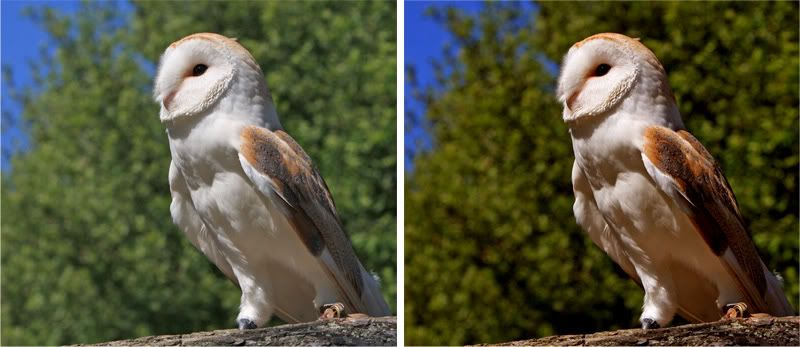
what the function? of course it's for adjust the light, contrast, and color balance. these are the main functions on it. further tips and tutorials? just always follow my blog =D
here is just an illustration:

5. area selector
find it on toolbox [on the left side on your screen].

these three tools and their variations is very useful to edit your spesific part of your object.
for simple selecting tutorial, you can see the example here.
this is the simple illustration:
3. brush
brush is very useful here, just like paint or another similiar software. the different is in photoshop, we can customize our brush freely, with many presets, and customization.
for the further tutorials about the brush, I will write it in separated post. =)
4. image adjustment
you can find it on image - adjustment. there are many options right?
what the function? of course it's for adjust the light, contrast, and color balance. these are the main functions on it. further tips and tutorials? just always follow my blog =D
here is just an illustration:
credit to: Roughcollie at dreamstime.com for the basic image
5. area selector
find it on toolbox [on the left side on your screen].

these three tools and their variations is very useful to edit your spesific part of your object.
for simple selecting tutorial, you can see the example here.

No comments:
Post a Comment